 TodaysBru
How to reduce repetitive IT tickets with AI chat
Use your existing knowledge base to answer common support questions before they become tickets, while keeping a clean escalation path for issues that need a person.
· 4 min read · The TodaysBru teamMany IT tickets begin as questions someone has already answered: how to connect to the VPN, where to find a shared drive, or what to do when a laptop will not start. Sending every question straight to an agent creates a queue for work that documentation could handle.
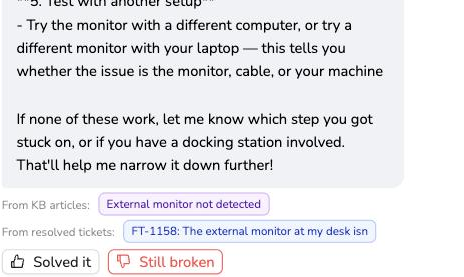
TodaysBru puts the knowledge base in front of the ticket. The requester describes the problem in AI chat, receives grounded steps with the source article visible, and can still create a ticket when those steps do not solve it.
1. Start with a small set of trusted articles
Add the answers your team gives repeatedly. Keep each article focused on one outcome, use numbered steps, and include the exact names of buttons or settings a requester will see. The assistant can only be as useful as the documentation behind it.
2. Let the requester ask in their own words
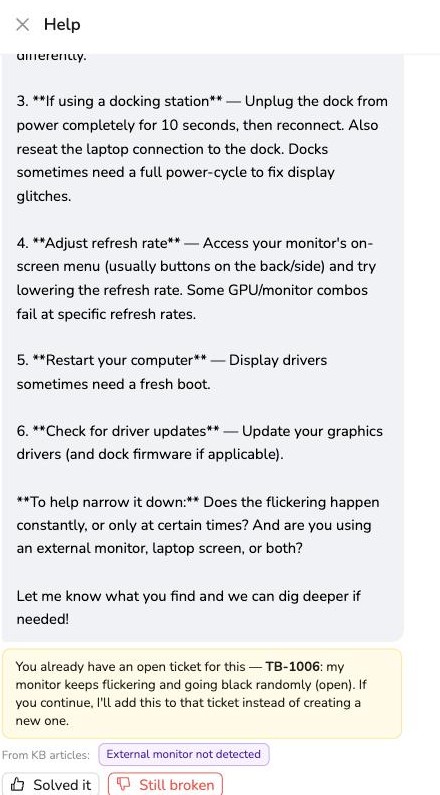
From the Tickets page, open the chat and describe the issue naturally. TodaysBru checks the message against the knowledge base before drafting a ticket and shows the matching source below the answer.
3. Escalate only when the answer is not enough
If the requester clicks Still broken, the conversation can be added to the matching open ticket or become a new ticket. The agent receives the original question and troubleshooting context instead of asking the requester to start over.
See the knowledge base answer demo or read the knowledge base section in Help to get started.