 TodaysBru
How to let employees submit IT request forms through chat
Make structured requests easier to find without losing the fields, approvals, and routing your IT team needs.
· 4 min read · The TodaysBru teamRequest forms are useful when a request needs specific information: a laptop, software access, or a new account. The problem is discovery. Employees often do not know which form to open, so they send an email or a vague ticket instead.
TodaysBru lets the requester describe what they need in chat. When the request matches an approved form, the assistant asks only for the missing fields, one at a time, then shows a summary before submitting it.
1. Create and review the form
In Admin → Request forms, describe the request and review the fields and approval routing generated for it. Keep the required fields limited to information the approver actually needs.
2. Let chat collect the missing fields
The requester can say, for example, “I need a company laptop.” The assistant recognizes the form and asks for the details that are not yet known, rather than presenting a long blank form.
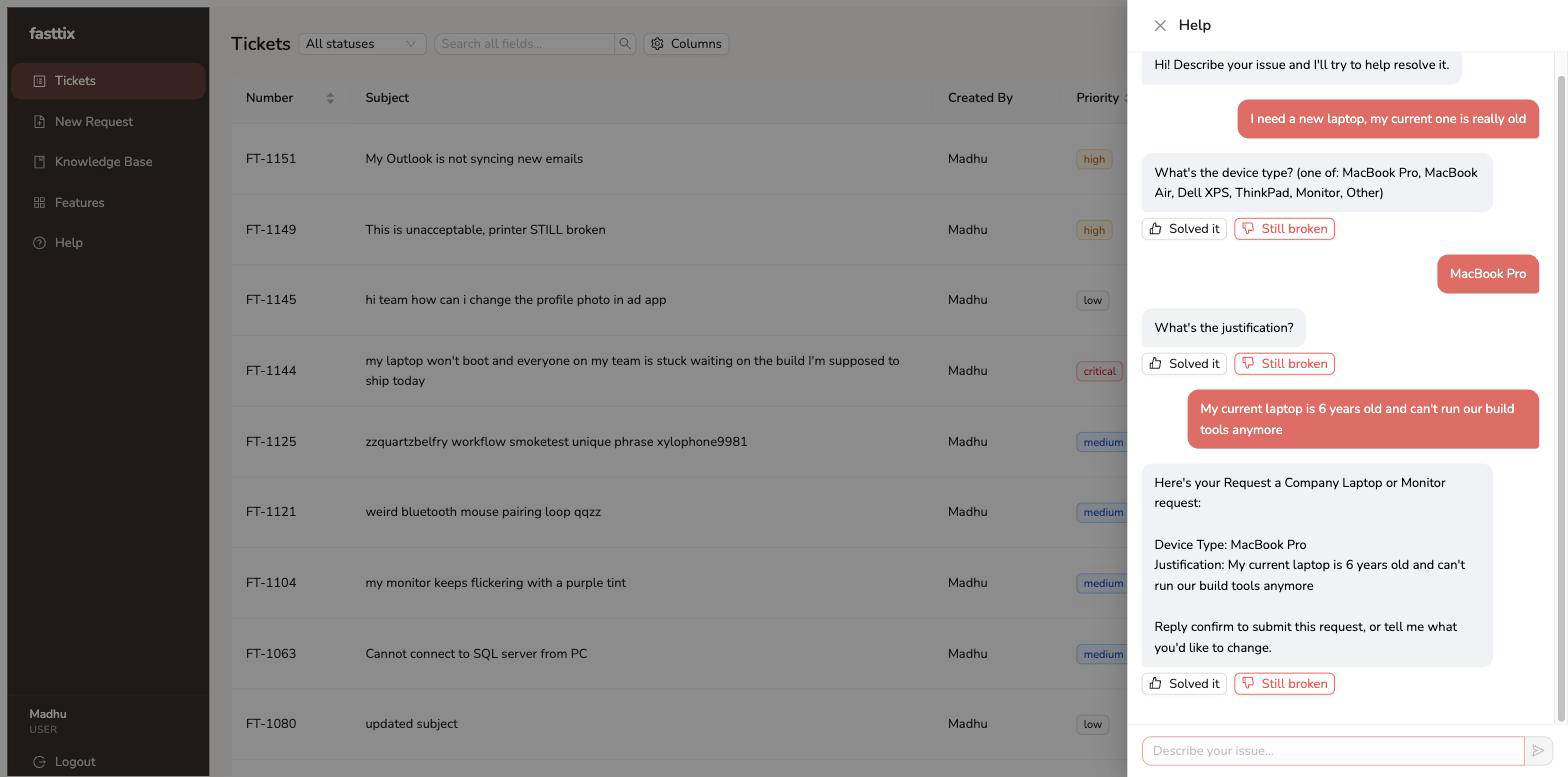 The same structured form and approval route, collected conversationally.
3. Confirm before submission
Chat displays a summary and waits for confirmation. Only then does it submit the request, apply the configured approval route, and create the ticket. Admins can also keep the form disabled while reviewing it.
Watch the chat experience and see the request form documentation for configuration details.