 TodaysBru
How to turn resolved IT tickets into knowledge base articles
Close the loop between support work and documentation by turning recurring, resolved tickets into reviewable article drafts.
· 4 min read · The TodaysBru teamKnowledge bases usually fall behind because writing an article competes with urgent support work. The result is a familiar cycle: the same problem is solved repeatedly, but the solution never becomes easier to find.
TodaysBru scans resolved tickets for recurring gaps and drafts an article from the actual troubleshooting work. An admin reviews the draft and its source tickets before publishing it.
1. Resolve tickets with useful detail
Capture the symptoms, verified cause, and steps that fixed the issue. The draft is grounded in those tickets, so clear resolution notes produce a more useful article.
2. Review the suggested draft
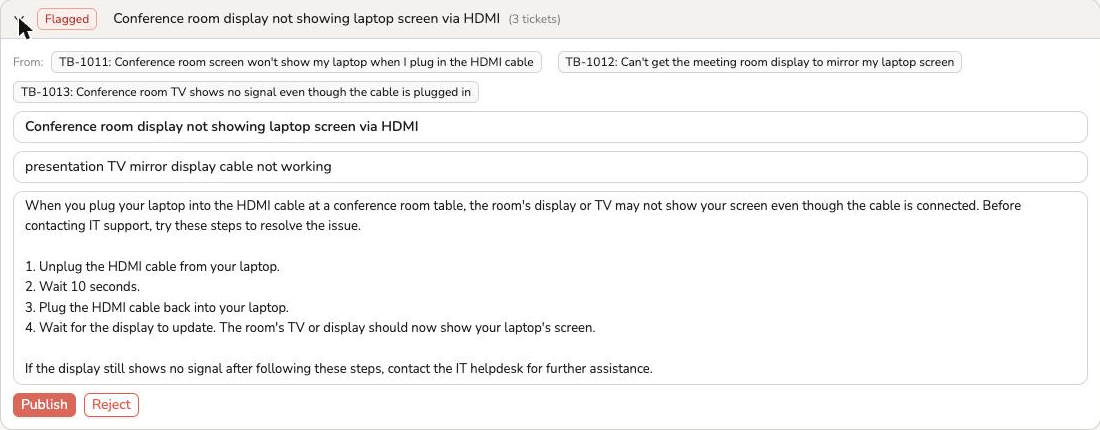
When TodaysBru finds enough similar resolved tickets without a matching article, it proposes a title, keywords, and numbered steps. The source tickets remain visible so an admin can check every claim.
3. Edit, approve, and publish
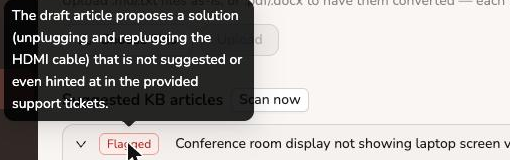
Treat the draft as an editor’s starting point. Fix any flagged line, remove details that are specific to one requester, and publish only after the steps work for the wider team. The article can then help answer the next question before it becomes a ticket.