 TodaysBru
Why Is Chrome So Slow? Turn a Vague IT Problem Into a Clear Next Step
Chrome keeps freezing with 20 tabs open. See how Bru classifies the issue and suggests next steps, then try your own IT issue without signing up.
· 3 min read · The TodaysBru teamTwenty tabs open. A page that won’t respond. Switching between work apps takes longer than it should.
You message IT: “Chrome is really slow.”
It describes the frustration. But it leaves a lot to work out: Is one website affected? Is the whole laptop struggling? Is this happening to one person or the entire team?
That’s where a useful support experience starts—with understanding the issue.
First, give it a little context
For our TodaysBru demo, we used this example:
“Chrome keeps freezing on my Windows laptop when I switch between tabs. I have about 20 tabs open. Other apps seem fine. It’s only affecting me, but it’s slowing down my work.”
You don’t need to know the cause. Just describe the app, what happens, and who’s affected.
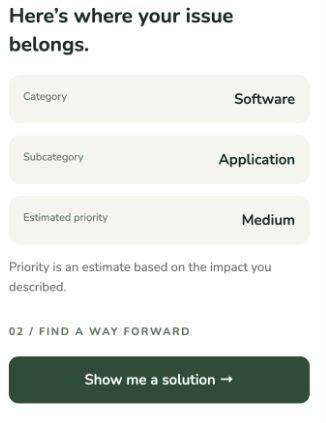
Click “Classify my issue”. Bru identifies whether it’s a supported IT issue and returns a category, subcategory and estimated priority based on your description.
In this run, it returned Software → Application, with Medium estimated priority. That’s an estimate from the stated impact, not a diagnosis of the laptop.
Then ask for a way forward
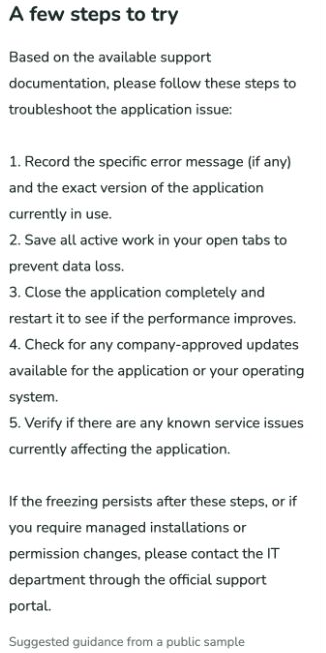
Click “Show me a solution” to get suggested troubleshooting steps.
For this example, the response suggested saving work, restarting the application, checking company-approved updates and known service issues, and contacting IT if the freezing persisted.
The aim is to give you a sensible place to start. Having 20 tabs open is a clue, but it doesn’t prove what’s causing the slowdown.
For Chrome performance problems, Google recommends checking unused tabs, unnecessary extensions and resource-heavy tasks in Chrome’s Task Manager. These checks can help narrow down what needs attention. See Google’s Chrome performance guide.
Why this matters for IT support
Employees describe symptoms in their own words. Support teams need enough structure to decide what happens next.
This demo shows that transition: a plain-language complaint becomes a categorized issue with an estimated priority, followed by suggested guidance when the user asks for it.
It’s a small taste of the experience. The public demo uses sample knowledge and has no access to your laptop or your company’s systems and policies.
Have an IT issue in mind? Try it with Bru—no signup required.
Use a non-sensitive example. The free demo has a shared allowance of 50 AI actions per day across the site. Classification and solution each use one action. If it’s used up, come back after midnight UTC.