 TodaysBru
Daily IT Helpdesk Report: 5 Metrics Every Manager Should Review
Start your morning with a 15-minute review of ticket volume, unassigned requests, SLA risks, aging tickets, and team workload.
· 5 min read · The TodaysBru teamThe queue is already moving when you start work. Overnight requests need owners, a few tickets are approaching their deadlines, and someone is asking for an update on a problem reported last week. Where do you start?
A useful daily helpdesk report should help you decide what needs attention, who should own it, and what happens next. These five checks give an IT helpdesk manager a practical morning routine.
The 15-minute schedule below is a suggested starting point. A major incident takes priority over the routine.
1. New versus resolved: are we keeping up?
Minutes 1–3
Start with yesterday’s incoming and completed work.
Suppose your team received 24 tickets and resolved 21. That tells you more tickets arrived than were resolved during the day. It does not, by itself, tell you that the team performed poorly. A service interruption, several complex requests, or reduced staffing could explain the difference.
Look at the requests behind the numbers:
- Did one issue generate several tickets?
- Was the increase concentrated in a particular service?
- Is this an unusual day or part of a continuing pattern?
Use the result to decide whether today needs different priorities, extra coverage, or a coordinated response to a recurring problem.
Keep the reporting period consistent. Yesterday’s calendar day and the last 24 hours can produce different totals.
2. Unassigned tickets: does every request have an owner?
Minutes 3–5
An unassigned ticket can sit unnoticed while everyone assumes someone else is handling it.
Start with business impact, then review the oldest requests. If three tickets are unassigned and one reports that an entire team cannot connect to the VPN, that request deserves investigation before a routine equipment question.
Assigning ownership should establish more than a name in a field. The owner needs to know:
- What needs investigation or action.
- Whether another team must be involved.
- When the employee should receive an update.
A named owner makes the next step clear, even when that person cannot complete the work alone.
3. SLA attention: which commitments need intervention?
Minutes 5–8
Review both tickets that have breached their resolution target and those approaching it.
For each, ask what would move the work forward. Is an approval missing? Does the technician need specialist help? Has the employee supplied information that nobody has reviewed?
A warning should prompt a decision. A breach should prompt a recovery plan and clear communication.
Be careful with the clock. Business hours, holidays, and permitted pauses affect measured SLA time. An employee may still have experienced a long wait even when the SLA clock is paused.
If your team needs clearer rules, start with the practical IT helpdesk SLA guide.
4. Aging tickets: what needs a follow-up?
Minutes 8–11
Review older open requests before they disappear beneath newer work.
Age is a useful signal, but it is not proof that a ticket has stalled. A replacement laptop awaiting delivery is different from an access request that nobody has touched.
For each older ticket, establish:
- What is keeping it open?
- Who owns the next action?
- When will someone follow up?
Avoid changing a status simply to make the queue look healthier. If a request is legitimately waiting, record the reason and make the next check explicit.
5. Team workload: where should we rebalance?
Minutes 11–15
Compare current open assignments across the team.
Suppose one technician has 16 tickets and another has 4. That is a reason to look closer, not an automatic instruction to move six tickets.
The smaller queue may contain a difficult incident. The larger queue may contain straightforward requests or work awaiting responses.
Consider urgency, complexity, skills, and availability before changing ownership. When you transfer work, include the context and next action so the new owner can continue without repeating the investigation.
A morning review should end with decisions
Here is an illustrative outcome from those five checks:
| Finding | Today’s action |
|---|---|
| Several overnight VPN requests | Confirm whether they share a cause and assign a coordinating owner. |
| Two breached tickets awaiting approval | Contact the approver and update the affected employees. |
| An older laptop request has no follow-up date | Confirm delivery status and schedule the next update. |
| An absent technician holds urgent work | Reassign the urgent cases with their investigation notes. |
A short list of decisions is more useful than a report everyone reads and nobody acts on.
Run the review in TodaysBru
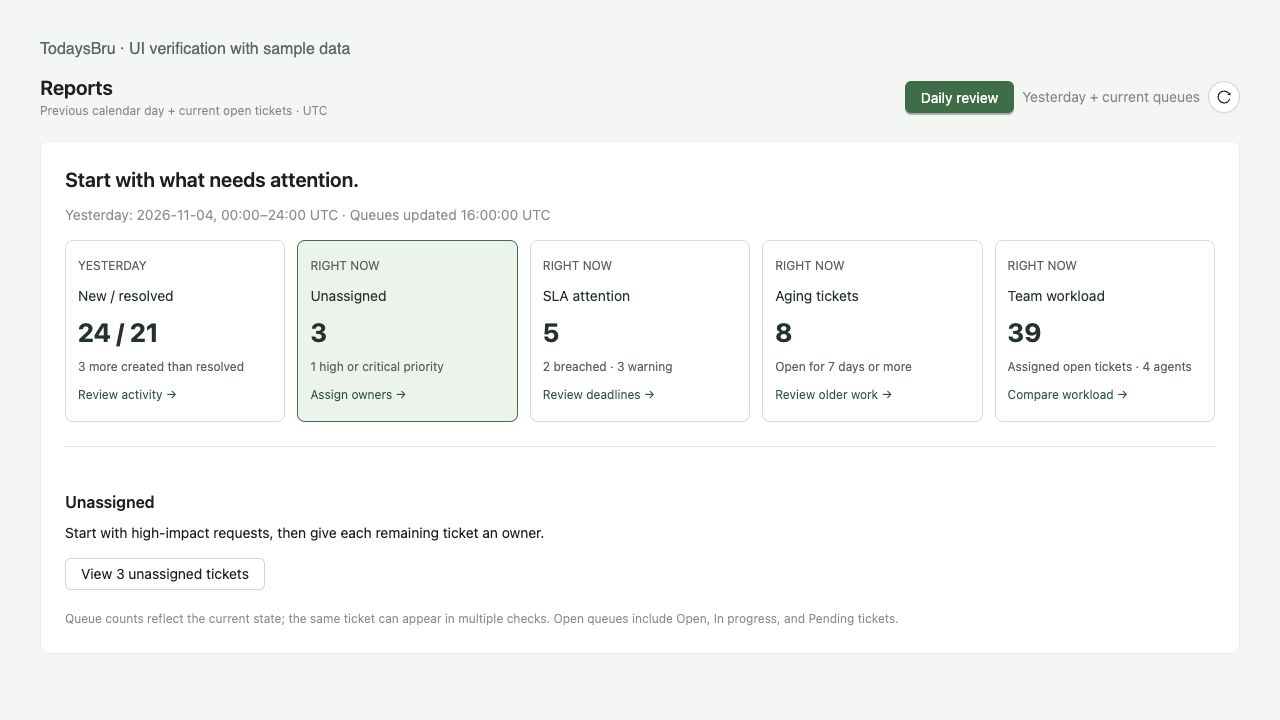
Open Reports → Daily review to see yesterday’s created and resolved tickets alongside current unassigned requests, SLA breaches and warnings, tickets open for at least seven days, and assignments by agent.
Select a summary, then open its ticket list to investigate or export CSV. Workload lets you inspect an individual agent’s assigned requests.
Yesterday’s activity uses the previous UTC calendar day. Current queues include Open, In progress, and Pending tickets, regardless of the standard Reports date filter. The same ticket can appear in several checks—for example, it may be both unassigned and overdue.
Use the daily review to direct today’s work. Save longer-term trends, recurring causes, and improvement planning for your weekly or monthly metrics review. See the Reports help guide for more on opening and exporting ticket lists.