 TodaysBru
How to Use an AI Helpdesk in Slack
Get IT answers from your knowledge base in a Slack DM, confirm when a fix works, and hand unresolved requests to your team with the conversation attached.
· 5 min read · The TodaysBru teamAn employee is already working in Slack when their VPN starts disconnecting or an application stops working. They should be able to describe the problem there and get useful help. With TodaysBru, an AI helpdesk conversation starts in a direct message to your connected Slack bot. It searches your knowledge base and similar past tickets, offers guidance, and asks whether that resolved the issue. Requests that still need a person become tickets with the conversation attached.
That gives IT teams two useful outcomes: more questions answered where employees already work, and a clearer starting point for the work that reaches a technician. Here is how the Slack workflow works, from the first message to resolution or handoff.
Start an IT support conversation in a Slack DM
Open your organization’s connected helpdesk app in Slack and use its Messages tab to send a direct message. Describe the problem in your own words and include an error message or relevant detail if you have it.
TodaysBru’s current Slack integration handles one-to-one bot DMs. It does not monitor public or private channels, and posting in a general help channel does not start this workflow. Your Slack email must match an existing account in the connected TodaysBru workspace. If the bot cannot find that account, it asks you to contact IT to get set up.
Get an answer grounded in your support knowledge
The assistant searches relevant knowledge articles and similar past tickets before composing its response. It can also use device context recorded in TodaysBru, such as the operating system of assigned hardware, to make guidance more relevant. That context comes from your workspace’s records; employees do not need to repeat every known detail in the opening message.
Replies include links to the knowledge articles used and references to similar past tickets when those sources are available. The linked article opens in your TodaysBru portal, where normal account access applies. A well-maintained KB therefore helps in both places: the portal and the Slack conversation.
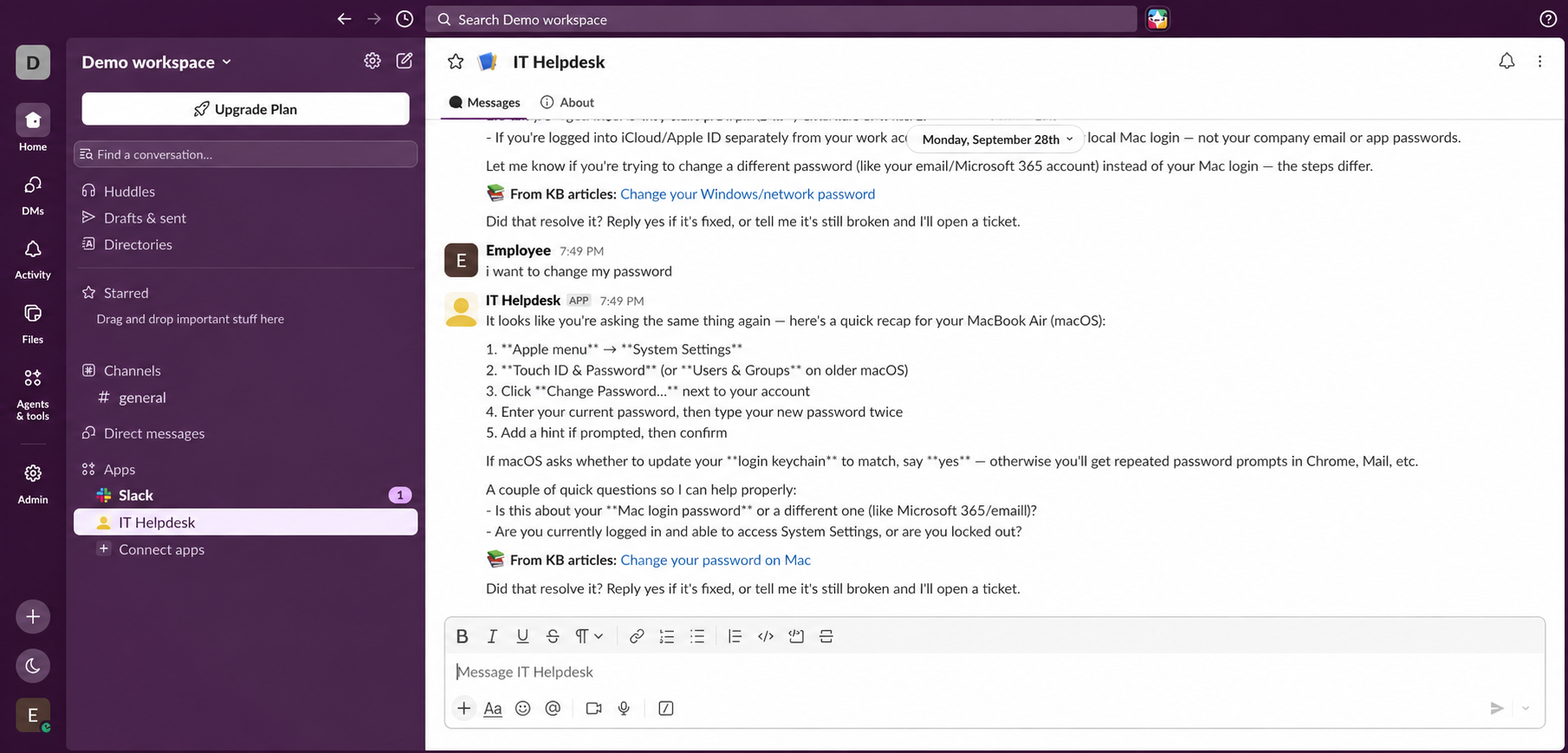 Slack demo edited with AI to anonymize employee, workspace, and app names. The conversation shows device context, a KB source, and resolution confirmation.
Follow a request through to an outcome
Consider a request such as: “The VPN disconnects on my work Mac when I join a video call. I’ve already restarted it.” If your KB contains the relevant troubleshooting guidance, the assistant can bring that into the conversation. The employee can follow the steps and add details as needed, instead of starting with a blank ticket form.
After troubleshooting guidance, the bot asks whether the issue is resolved. Reply yes when the fix works, and TodaysBru marks the conversation resolved. Tell it the issue is still broken when you need a person to take over. A conversation that ends with a useful answer can finish without creating a ticket.
This pattern applies beyond password questions. VPN instructions, software setup, and company-specific troubleshooting are useful candidates when your workspace has the knowledge to answer them. The practical goal is to make more of that knowledge available in the moment an employee needs it.
Carry the conversation into the ticket
When the employee says the problem remains, TodaysBru creates a ticket with the conversation as its description and applies the workspace’s classification and workflow rules. The technician receives the original request, the guidance offered, and the employee’s follow-up, rather than asking them to start again. If the assistant has already identified the employee’s matching open ticket, it adds the conversation there instead of opening another one.
Employees can also ask about their ticket’s status in the Slack DM. Including the ticket number helps identify the request. If an earlier conversation has gone quiet for a while, the bot can ask whether the next message concerns that issue or something new.
Prepare the workspace before inviting employees
A TodaysBru operator needs to connect and configure the Slack bot for your workspace. This integration is not currently a self-service “Add to Slack” installation from the TodaysBru interface. For operators working on the Slack app configuration, Slack’s App Home guide explains the Messages tab and direct-message events.
Before rollout, check three paths with an employee account: a question your KB can answer, an unresolved issue that needs a ticket, and a status question about that ticket. Confirm that the source links open in the correct workspace and that the handoff retains the conversation. Make sure employees know which bot to message and that their work email matches their TodaysBru account.
Start with knowledge your team already trusts, then improve the topics that repeatedly need human help. Read how to turn resolved tickets into knowledge articles, how device context reduces repeated questions, and which AI helpdesk metrics show what employees resolve and what still reaches the team.